AI Automation: A Guide for Ops Leaders

Tanjim Islam
Founder & CEO · · 13 min read


AI workflow automation means the AI reads messy inputs like emails, PDFs and forms, and the workflow moves each one through steps you already defined. A person checks anything risky. Start with one boring, frequent job, measure it, and keep the AI on rails.
This is the ops leader playbook. If you want the plain definition first, read what is AI automation. Below is how it plays out on a real Monday morning, and how to decide what to hand over first.
What does AI Automation do on a Monday morning?
Picture a shared inbox at 9am. Forty new emails. Some are invoices, some are delivery complaints, two are from a new supplier asking for a contract. Someone on your team opens each one, decides what it is, copies a few numbers into another system, and forwards it to the right person.
AI Automation does that sorting and copying. Many teams search for this as AI workflow automation: the AI does the reading, and the workflow does the rest. It reads each email, tags it ("invoice", "complaint", "contract request"), pulls out the fields that matter, writes them into the right system, and routes the item. Your person now looks at a short list of things the system was unsure about, instead of all forty.
Old style automation could only follow exact rules: if the subject line contains "Invoice", move it here. It broke the moment a supplier wrote "Bill for March". The AI part is what handles that variety. It understands that "Bill for March" and "Invoice #2231" mean the same thing.
How does an AI workflow actually run, step by step?
Most AI workflows have five parts: trigger, read and understand, decide the route, act, and check. The AI does the reading, while your rules and your people handle the rest.
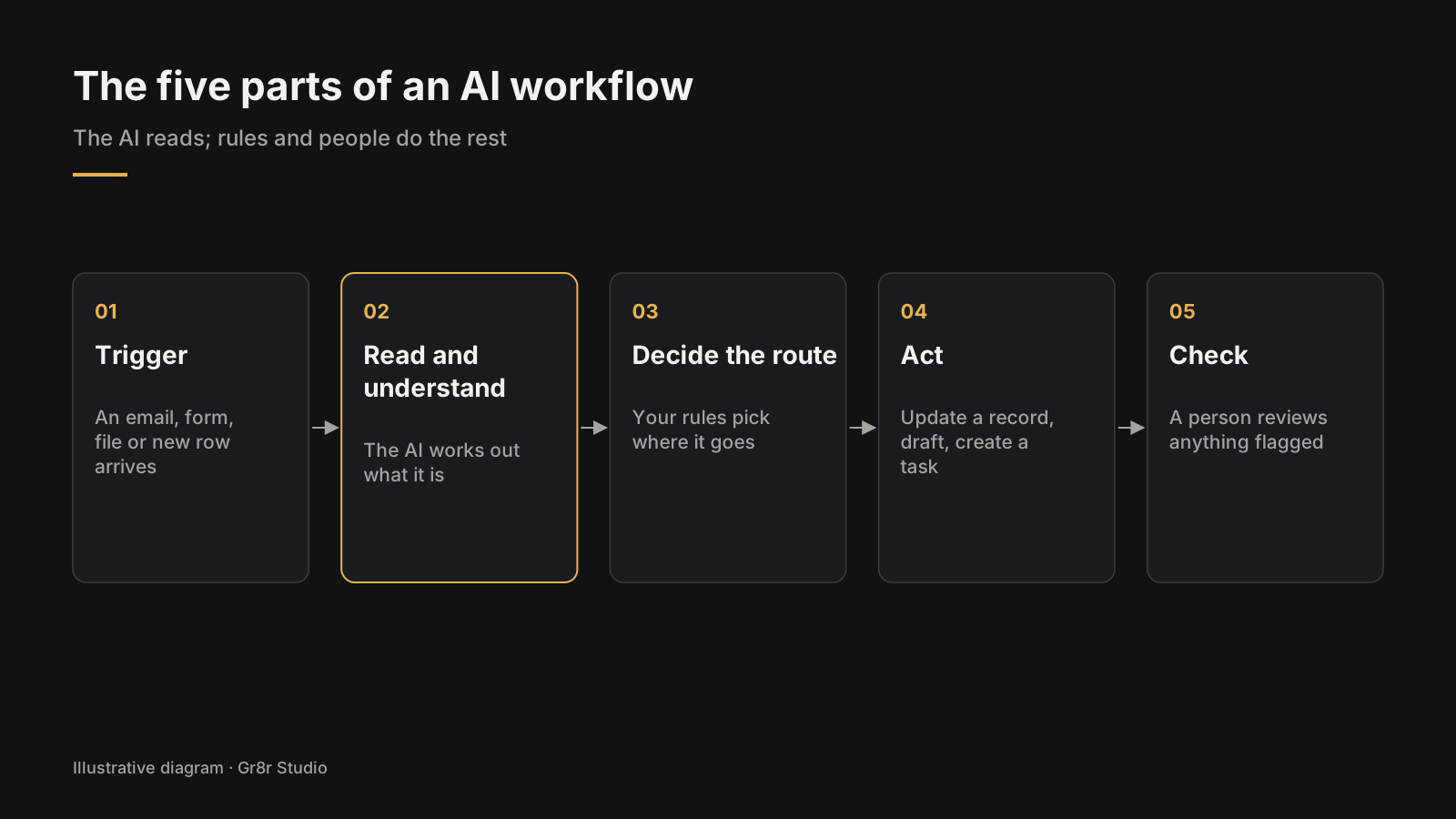
Almost every AI workflow has the same five parts. Once you see them, you can sketch your own on a whiteboard.
- Trigger. Something arrives: an email, a form, a file in a folder, a new row in a spreadsheet.
- Read and understand. The AI reads it and decides what it is and what it says.
- Decide the route. Plain rules, written by you, decide where it goes next based on what the AI found.
- Act. The system updates a record, drafts a reply, creates a task or pings a person.
- Check. A person reviews anything the system flagged as unsure, unusual or risky, and the result is logged.
Notice that the AI only does step 2, and sometimes part of step 4. The route in step 3 is still your rules. That split is deliberate. It keeps the part that guesses small and the part that decides predictable.
Anthropic's engineering team draws the same line. In "Building effective agents" (19 December 2024), they describe workflows as systems where models and tools follow predefined code paths, and agents as systems where the model directs its own process. Their advice is to find the simplest solution possible and only add complexity when it is needed (Anthropic, 19 December 2024).
What is the difference between rules, AI workflows and AI agents?
Rules follow exact instructions. AI workflows follow your steps but use AI for judgment inside them. Agents choose their own steps. Each one suits a different kind of job.
| Fixed rules | AI workflow | AI agent | |
|---|---|---|---|
| Handles messy inputs | No | Yes | Yes |
| Steps decided by | You, in advance | You, in advance | The AI, as it goes |
| Easy to test | Very | Fairly | Hard |
| Good for | Clean, structured data | Repeated jobs with varied inputs | Open ended tasks with many paths |
| Typical example | Copy form fields to a CRM | Read invoices and match them to orders | Research a supplier and draft a summary |
Most operations work belongs in the middle column. If you are unsure, start there. The tradeoffs between rules and AI get their own post in RPA vs AI automation, and agents versus chatbots in AI Agent, Chatbot or Workflow.
Which workflows should you automate with AI first?
Start with work that is frequent, repetitive and dull, where a mistake is cheap and easy to catch. Leave rare, high stakes calls for later.
A simple test. Score each candidate on five questions:
- How often does it happen? Daily beats monthly.
- Is it done the same way each time? If three people do it three ways, fix the process first.
- What does a mistake cost? A mistagged email is cheap. A wrong payment is not.
- Can you see the result? If nobody would notice a mistake, nobody will catch one.
- Can the system reach the data? If the inputs live in someone's head or a locked system, start there.
Our view at Gr8r: the automations that pay off first are the boring internal ones, such as data entry, lead qualification, sorting customer feedback and building routine reports. They rarely look impressive in a pitch deck, and they save the most hours.
Good first candidates:
- Sorting and routing inbound requests from a shared inbox
- Pulling fields out of invoices, delivery notes or claims forms
- Drafting first replies to routine customer questions for a person to approve
- Turning meeting notes into tasks in your project tool
- Building the weekly report from data you already have
A full scoring method lives, and a longer list of examples.
Where should people stay in charge of an automated workflow?
Sort every action into three lanes: green where the system acts alone, amber where it drafts and a person approves, and red where a person decides and the system only assists.
Keep a person in charge wherever a mistake costs money, reaches a customer, or cannot be undone. Let the system run alone only where errors are cheap and visible.
Think of it as three lanes:
- Green lane: the system acts alone. Tagging, filing, updating internal fields, creating draft tasks.
- Amber lane: the system drafts, a person approves. Replies to customers, purchase orders, anything sent under a person's name.
- Red lane: a person decides, the system assists. Refunds above a limit, contract terms, anything legal or medical.
Every workflow also needs an exception queue: a single screen where flagged items land, with the original input, what the AI thought it was, and buttons to fix and move on. This is the screen your team will live in. If it is clumsy, the whole system feels clumsy, however clever the AI is.
The US National Institute of Standards and Technology describes the qualities to aim for in its AI Risk Management Framework (January 2023), including systems that are valid and reliable, safe, accountable and transparent (NIST AI RMF 1.0). In an operations workflow, "accountable and transparent" means something concrete: a log that shows what the system did with each item, and who approved it.
Should you buy an automation tool or build a custom workflow?
Buy when the job lives inside one or two apps and a mistake is cheap. Build when it crosses several systems, touches sensitive data, or a wrong step costs real money.
| Situation | Usually buy | Usually build |
|---|---|---|
| Systems involved | One or two common apps | Several, including your own |
| Data | Low risk | Customer, health, financial |
| Volume | Low to medium | High, with many exceptions |
| Who reviews exceptions | Whoever gets the alert | A team that needs its own queue screen |
| Change over time | Rarely | Often, as the business grows |
Most teams choose among three options: the automation features already inside your helpdesk, CRM or accounting tool; a connector tool that links several apps; or a custom workflow with its own screens. Connector tools like Zapier, Make and n8n are a sensible place to learn, and n8n suits teams with a developer on hand. The trouble starts when a tool built for simple chains is stretched over a process with ten exceptions and three approval steps. The deeper comparison is in Custom AI or Off the Shelf Tools for Your Workflow?.
What does an AI workflow project look like from start to finish?
A good project moves in small, visible steps:
- Map the current process. Sit with the people who do it. Write every step, every system and every "it depends".
- Measure the baseline. How many items a week, how long each takes, how often something goes wrong. Write it down before anything changes.
- Design the exception screen first. Decide what a person sees when the system is unsure. This shapes everything else.
- Build the narrowest path. One input type, one route, end to end.
- Run in shadow mode. The system processes real items, but people still do the work. Compare.
- Switch on, lane by lane. Green lane first, then amber.
- Review monthly. Look at the exception rate and the log. Tighten rules, widen scope.
Put a working screen in front of your team early. People react faster to a screen than to a document. Timelines for a full project are covered, and a worked example in How to Automate Invoice Processing With AI, Step by Step.
What does workflow software look like when it is built well?
It looks like a calm queue. The person using it sees what needs them today, why, and what to do about it.
Here are a few operations products Gr8r designed and built itself. Built by Gr8r for its own portfolio. Not client work.
- Orvyn, a logistics exception management web app
- Torven, an inventory and replenishment SaaS
- Avelis, a healthcare referral coordination SaaS
- Reluma, a renewal management platform
- Veluno, a supplier onboarding and renewals SaaS
- Cendara, a medical claims operations SaaS
- Sortie, an automation delivery SaaS
- Nuvora, a financial close workspace
All of these were built by Gr8r for its own portfolio. Not client work. Only Avelis is linked here, because the others open on a sign in page. The full set is on our products page.
How do you measure whether an AI workflow is working?
Track five numbers before and after: items per week, minutes per item, exception rate, error rate and time to done. Pick the one that counts before you build.
Measure the same few numbers before and after, and decide which one counts before anything is built. If you pick the number afterwards, every project looks like a win.
Five numbers cover most workflows:
| Number | What it tells you | How to get it |
|---|---|---|
| Items per week | How much work flows through | Count from the inbox, system or spreadsheet |
| Minutes per item | How long a person spends on each | Time 20 items by hand before you start |
| Exception rate | How often the system asks a person | The exception queue counts it for you |
| Error rate | How often the result was wrong | Sample a fixed number of finished items each week |
| Time to done | How long from trigger to finished | Timestamps on the trigger and the final step |
Write the baseline down on paper, with a date. Memory makes the old way look worse than it was.
Then watch the exception rate most closely. If it stays high, the AI is unsure about too many items, which usually means the inputs vary more than you thought or the rules need another branch. If it drops to near zero overnight, be suspicious too. A system that is never unsure is often wrong without knowing it, so keep sampling finished items by hand.
What does an AI workflow cost to run?
Running cost has five parts, and you can estimate each before you build. Fill these in with your own numbers rather than anyone's averages.
| Input | Where to find it |
|---|---|
| Items per month | Your baseline count |
| Model cost per item | Your AI provider's published pricing, times the text each item uses |
| Review time | Exception rate times minutes per review times your team's hourly cost |
| Hosting and tools | Your cloud bill and any connector tool plan |
| Upkeep | Hours a month to adjust rules, prompts and test sets |
Review time is usually the line people forget, and it is the one good exception screens shrink. Compare the total against the hours the work takes today, using the baseline you measured.
What does an AI workflow need from your systems and data?
It needs three things. Most delays in a project come from one of these, rarely from the AI itself.
- A way in. The system has to receive the trigger. That might be a shared inbox it can read, a folder it watches, or a webhook from your form tool. Check early that your systems allow it, and who has to approve the access.
- A way out. It has to write results somewhere useful: your CRM, accounting system, ticketing tool or a spreadsheet the team already trusts. If the target system has no way for software to write into it, the workflow ends in a copy and paste step.
- Examples. Collect 30 to 50 real past items, each with the right answer next to it. These become the test set you rerun every time something changes.
Sensitive data needs a decision up front: which fields the AI may see, where they are processed, and how long anything is kept. Write that down before building, and show it to whoever owns compliance in your business.
What are the most common AI automation mistakes?
Most failures come from automating a messy process instead of fixing it, or from giving the AI too much freedom too early.
- Automating chaos. If the process differs by person, the automation inherits every difference.
- No baseline. Without a before number, nobody can say whether it worked.
- No exception screen. Flagged items land in someone's email and get lost.
- Agent first. Reaching for an agent that plans its own steps when a fixed workflow would do.
- Skipping shadow mode. Switching on for customers before watching a week of real items.
- Nobody owns it. Rules drift, inputs change, and the system slowly gets worse without anyone noticing.
Where do you start with AI in your operations?
Start with one workflow, one owner and one number. Everything else follows from those three.
Pick the task your team complains about most that also happens most often. Name the person who will own it. Write down how long it takes today. Then sketch the five steps: trigger, read, route, act, check. The broader question of rolling AI out across a business is covered, and building agents for real tasks in how to build AI agents for business.
Frequently asked questions
Is AI Automation worth it for a small or midsize business?
It is worth it when you point it at one task your team does the same way many times a week, such as sorting inbound requests or keying invoice data. Measure the task before you start so you can prove the gain.
Should we use Zapier, Make or n8n, or build something custom?
Use an off the shelf tool when the job lives inside one or two apps and a mistake is cheap. Build custom when the workflow touches several systems, sensitive data, or customers directly, or when a wrong step costs real money. Many teams start with a tool and move later.
Should an ops workflow use fixed steps or an AI agent?
Use fixed steps for most ops processes. You write the steps, and the AI fills in the judgment inside each one, which makes the workflow easier to test and trust. Reach for an agent that plans its own steps only when a fixed workflow would not do, and only after the simple version works.
Which processes should we automate with AI first?
Pick work that is frequent, repetitive and currently done late or by hand: lead follow up, data entry from documents, routine reports, triage of inbound requests. Avoid starting with rare, high stakes decisions or anything customers will judge you on before you have tested it internally.
What does my ops team do once a workflow is live?
They work the exception queue, where flagged items land with the original input and what the AI thought it was. They make the judgment calls and approvals, watch the exception rate, and keep sampling finished items by hand. The AI takes the copying, sorting and first drafts.
Your next step
Write down the one task your team repeats most. Time it this week. If you want help mapping it into the five steps, book a 30 minute call with me.
LedgerOS, a finance operations app Gr8r built, shows an exception view in practice: its Needs Attention panel lists a high risk payment with a risk score and a batch of vendor payments marked Approval Required. Built by Gr8r for its own portfolio. Not client work. It runs on demo data, so it shows the screens, not results.
Related reading
- what is AI automation
- RPA vs AI automation
- how to automate invoice processing with AI
- how to build AI agents for business
- the AI ownership checklist
- AI Automation services
Tanjim Islam is the founder of Gr8r Studio, a digital product and AI engineering partner for scaleups and enterprise teams, founded in 2023.