How to Automate Invoice Processing With AI, Step by Step

Tanjim Islam
Founder & CEO · · 6 min read


To automate invoice processing with AI, split the job in two. AI reads each invoice and pulls out the fields, with a confidence score for each. Your own rules then check, match and route it. Clean invoices flow through to approval and posting. Anything unclear goes to an exception inbox where a person decides.
Contents
- What are the seven steps of an AI invoice workflow?
- What does the AI actually read off an invoice?
- What is a three way match?
- Where do people step in?
- Has Gr8r built in this space?
- How do you know the workflow is working?
- Where should you start?
- Checklist before you go live
- Frequently asked questions
What are the seven steps of an AI invoice workflow?
The workflow has seven steps. Only the reading is AI; the rest is your rules and your people.
- Capture. Invoices arrive by email, upload or supplier portal. The workflow collects the file and logs where it came from.
- Read. An AI model extracts vendor, invoice number, dates, PO number, line items, tax and total.
- Check. Your rules test the basics: required fields present, totals add up, the vendor exists, it is not a duplicate.
- Match. The invoice is compared against the purchase order and, where you use them, the goods receipt.
- Route. Clean invoices go to the right approver. Problems go to the exception inbox.
- Approve. A person with authority approves, edits or rejects.
- Post. The approved invoice is written to your accounting system, with a link back to the original file.
Only step 2 is the AI guessing. Steps 3 to 7 are your rules and your people. That split is what makes the workflow safe to run. The general pattern is in AI Automation guide for ops leaders. New to the idea? Start with what is AI automation.
What does the AI actually read off an invoice?
Prebuilt invoice models return the fields you'd expect, each with a confidence score. Microsoft's documentation for its AI Builder invoice model, for example, lists outputs such as vendor name, invoice ID, invoice date, due date, purchase order, subtotal, total tax and invoice total, and for each one a confidence value described as a "Score between 0 (low confidence) and 1 (high confidence)" (Microsoft Learn, AI Builder invoice processing model).
That score is what the next steps use. You pick a threshold per field. A low score on the total sends the invoice to a person. A low score on the shipping address might not matter at all. Which model or product you use is a separate choice; see our tool comparisons.
What is a three way match?
It is a check that three documents agree: what you ordered (the purchase order), what arrived (the goods receipt) and what you are being charged (the invoice). Quantity, unit price and total should line up.
Exact matches are rare in real life. Freight gets added, prices round differently. So you set tolerance rules in plain terms, written by your finance team. For example: accept a price difference within an agreed small amount, flag anything above it. The AI does not decide the tolerance. Your team writes it, and the workflow applies it the same way every time.
Two way match (PO and invoice only) works for services where nothing physical arrives.
Where do people step in?
At the exception inbox. This is the screen most write ups skip, and it is where your team will spend its time.
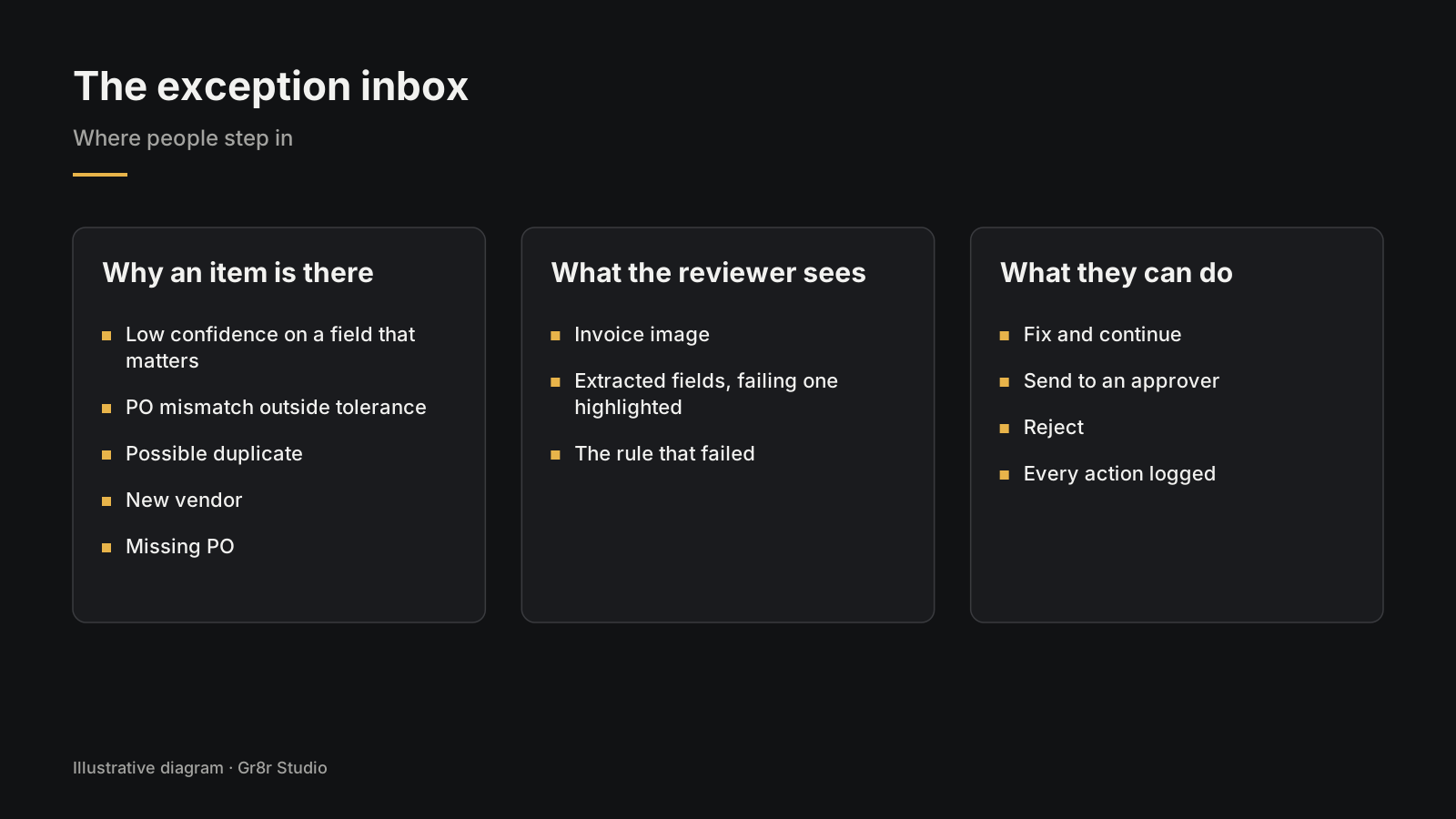
Each item in the inbox says why it is there, in a tag people can filter by:
- Low confidence on a field that matters
- PO mismatch outside tolerance
- Possible duplicate of an invoice already paid
- New vendor not yet in your system
- Missing PO for a vendor who should have one
Open an item and the person sees the invoice image, the extracted fields with the failing one highlighted, and the rule that failed. Three buttons: fix and continue, send to an approver, or reject. Every action is logged with who did it and when.
The goal is that people only touch invoices that need judgment. Patterns for the review screen itself are in designing the review step before an AI agent acts.
Has Gr8r built in this space?
Veyra is a procurement and invoice approvals SaaS that Gr8r built in house. Built by Gr8r for its own portfolio. Not client work. Its sign in page offers demo roles with different approval authority, such as a Finance Reviewer with a $15k limit, a Controller and an Admin, which is the routing step this section describes. More are on our products page.
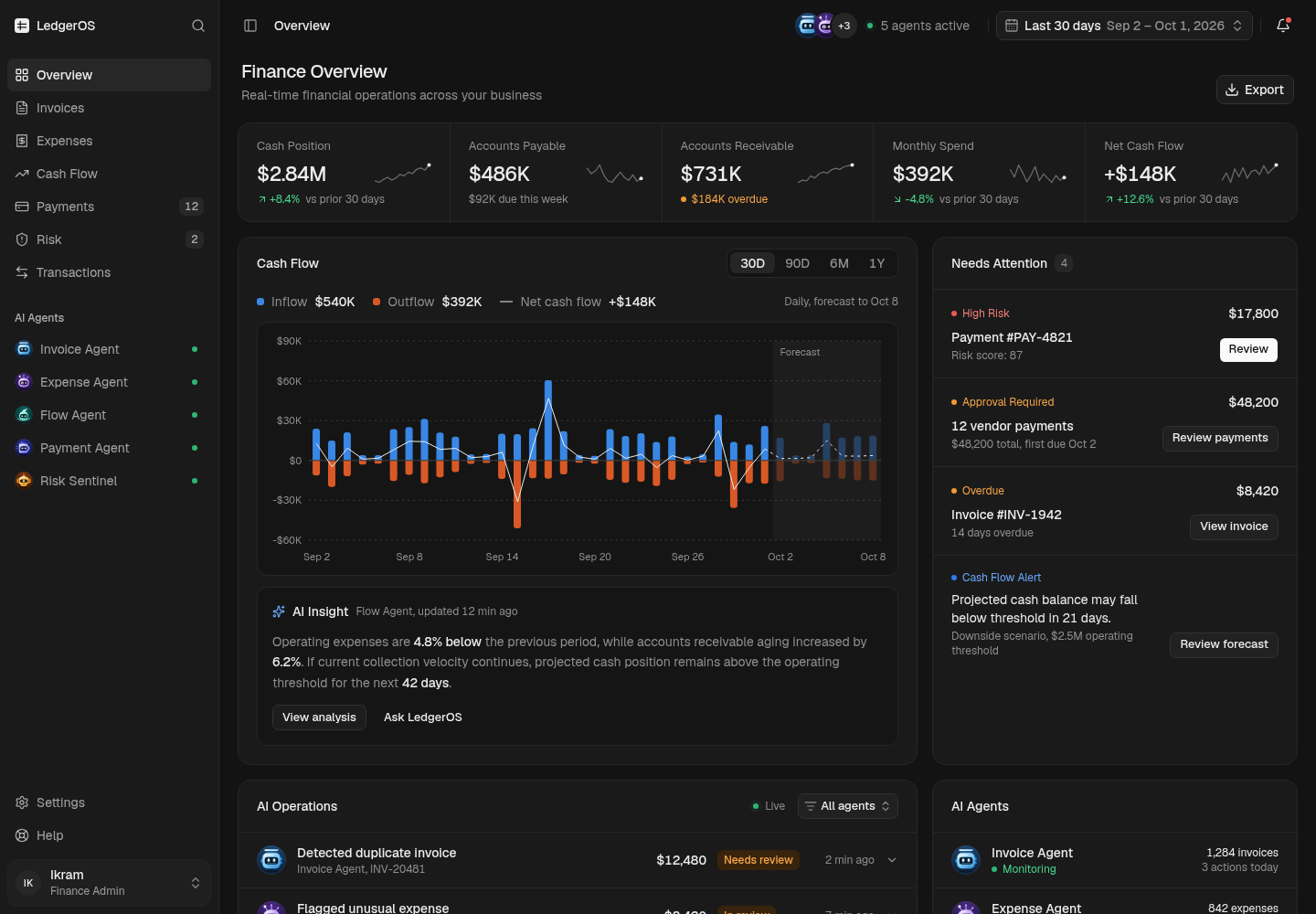
LedgerOS, another finance app Gr8r built, shows the later steps: an Invoice Agent in the sidebar, an overdue invoice flagged on the overview, and vendor payments held for approval. Built by Gr8r for its own portfolio. Not client work. It runs on demo data, so it shows the screens, not results.
How do you know the workflow is working?
Track a few numbers from week one:
- Share of invoices that pass straight through with no human touch
- Exception inbox size and age of the oldest item
- Which reason tags show up most
- How often people change a field the AI marked high confidence
That last one matters most. If people keep correcting "confident" fields, the threshold is wrong or the model is struggling with a particular vendor's layout. Fix that before you raise the share of invoices that skip review.
Where should you start?
Pick one entity, one inbox and your highest volume vendors. Run the workflow alongside your current process for a few weeks and compare results before you switch. Other candidates for automation are, and more examples.
Checklist before you go live
Before go live, confirm logged capture sources, confidence thresholds, a duplicate check, tolerance rules from finance, an exception inbox, approval limits, a full action log, and links back to original files.
- Capture sources listed and logged
- Confidence threshold set per field
- Duplicate check on vendor, invoice number and amount
- Tolerance rules written by finance, not the model
- Exception inbox with reason tags
- Approval limits by amount and role
- Every action logged with person and time
- A link from the posted entry back to the original file
Frequently asked questions
How accurate is AI at reading invoices?
It varies by model, invoice layout and scan quality, so test it on a sample of your own invoices before you trust it. Use the confidence score each field returns, and send low scores to a person instead of relying on an average accuracy figure.
What is a three way match in invoice processing?
It checks that the purchase order, the goods receipt and the invoice agree on quantity, price and total. Differences within tolerance rules your finance team sets can pass; anything outside them goes to a person.
Which tool should we use to automate invoice processing?
It depends on your accounting system, invoice volume and how much you want to build. Compare options side by side before choosing. The workflow steps in this guide stay the same whichever tool you pick.
Does AI invoice processing still need human review?
Yes, for exceptions. Clean invoices that pass every rule can flow through to approval, but low confidence fields, mismatches, possible duplicates and new vendors should go to a person in an exception inbox.
What should we measure in the first weeks of an AI invoice workflow?
Track the share of invoices that pass straight through, the size and age of the exception inbox, the most common reason tags, and how often people correct a field the AI marked high confidence. That last number tells you when a threshold is wrong.
About the author
Tanjim Islam is the founder and CEO of Gr8r Studio. He founded the studio in 2023. Here he writes about how Gr8r approaches hiring, product design and AI engineering. More on the About page.
If you want help with this, book a 30 minute call.