What Is AI Automation? Rules, Models and One Worked Example

Tanjim Islam
Founder & CEO · · 7 min read


This post gives you a definition you can repeat in a meeting, shows where rules end and the model begins, and walks through one example step by step. For the full playbook, read our AI Automation guide.
What is AI automation, in one sentence?
AI automation is software that runs a business task on its own by pairing fixed rules with an AI model: the model reads and guesses, the rules decide, and a person checks anything risky.
That sentence has three parts, and each one matters.
- The model reads and guesses. It turns an email, a PDF or a photo into fields: who sent it, what they want, how much, by when.
- The rules decide. If the amount is under a limit and the supplier is known, file it. If not, send it to a person.
- A person checks. Anything uncertain, expensive or customer facing waits for a human.
Vendors define it in similar terms. AWS says AI automation uses AI "to expand the capabilities of robotic process automation" so it can "categorize documents, label images, respond to customer queries, and more" (AWS, What is AI Automation?, fetched 25 Oct 2026). UiPath describes it as expanding automation "beyond structured rule-based workflows to the processing of semi-structured and unstructured documents, conversations, and visual content" (UiPath, What is AI automation?, fetched 25 Oct 2026). Our sentence adds the part they leave out: who is in charge of the decision.
How is AI automation different from plain automation?
Plain automation follows rules on tidy data. "When a form is submitted, add a row to the sheet and email the sales team." It never guesses. It also breaks the moment the input is messy.
AWS puts the limit well: plain automation "is best suited for repetitive tasks like scheduling an email, data entry, and tasks that are the same every single time."
AI automation keeps the rules and adds a reader in front of them. The reader can handle a supplier who sends invoices as photos, a customer who writes three paragraphs instead of picking a dropdown, or a contract with the key date on page nine.
Where do rules end and the model begin?
This is where the line is easy to draw in the wrong place.
| Job in the task | Who should do it | Why |
|---|---|---|
| Read an email, PDF or image | AI model | Inputs are messy and varied |
| Pull out fields (name, amount, date) | AI model | Needs reading, not matching |
| Check the amount against a limit | Rule | It is a fixed number you set |
| Match a supplier to your records | Rule, model as backup | Exact match first, fuzzy match second |
| Decide the route (file, flag, reject) | Rule | You want the same answer every time |
| Draft a reply | AI model | Writing is what models are good at |
| Send money or send to a customer | Person approves | Hard to undo |
A good test: if you could write the decision on a sticky note, it is a rule. If you would need to show someone ten examples before they got it, it is a job for the model.
OpenAI makes the same split in its guide to agents. "A traditional rules engine works like a checklist, flagging transactions based on preset criteria," while a model works "more like a seasoned investigator, evaluating context" (OpenAI, A practical guide to building agents, 15 Jan 2026, fetched 25 Oct 2026). Use the checklist where you can. Use the investigator where you must.
What does AI automation look like on a real task?
Here is an illustration, not a real client. A 30 person logistics firm gets about 400 supplier invoices a month into one shared inbox. Two people in finance open each one, type the supplier, invoice number, amount and due date into the accounting tool, then chase approvals by email.
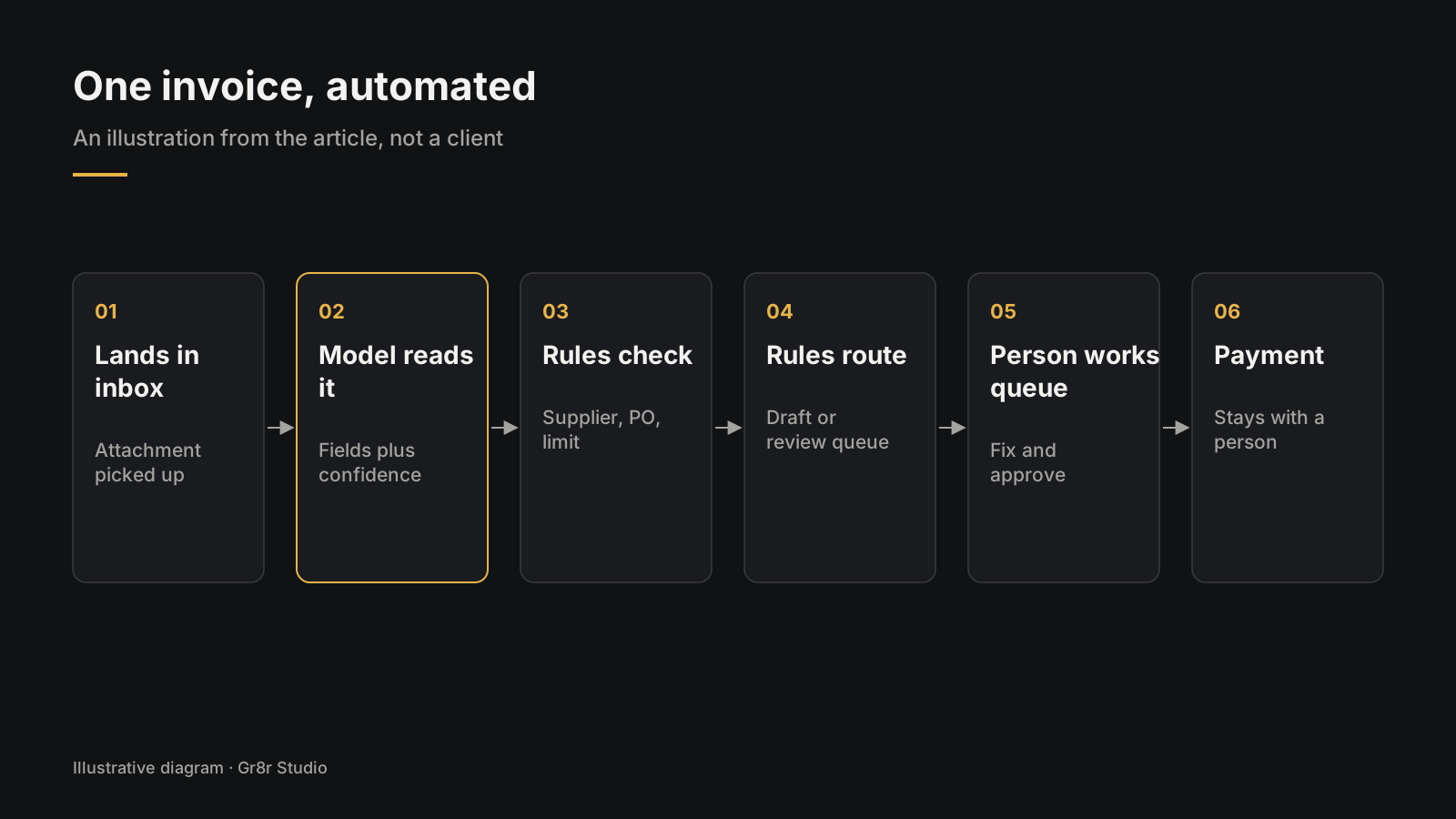
With AI automation, the same task runs like this:
- An invoice lands in the inbox. The system picks up the attachment.
- The model reads it and pulls out supplier name, invoice number, date, amount and line items. It also gives a confidence level for each field.
- Rules check the result. Is the supplier in the records? Does a purchase order match? Is the amount under the auto approve limit? Is any field low confidence?
- Rules pick a route. Everything checks out: it goes into the accounting tool as a draft. Anything fails: it goes to a review queue with the problem field highlighted.
- A person works the queue. They see the invoice image next to the pulled fields, fix what is wrong and approve.
- Payment stays with a person. The system never releases money on its own.
The finance team stops typing and starts checking. The step by step build of this kind of flow is in our AI invoice processing workflow post.
Finance is a sector Gr8r builds in for itself. Nuvora is a financial close workspace. Built by Gr8r for its own portfolio. Not client work. It sits behind a login, so there is no link here.
Is AI automation the same as an AI agent?
No, and the difference changes how much you can trust it.
Anthropic draws the line clearly. Workflows "are systems where LLMs and tools are orchestrated through predefined code paths." Agents "are systems where LLMs dynamically direct their own processes and tool usage" (Anthropic, Building effective agents, 19 Dec 2024, fetched 25 Oct 2026). It also advises "finding the simplest solution possible, and only increasing complexity when needed."
AI automation, as we use the term, sits on the workflow side. You write the steps. The model fills in the reading and writing. That makes it easier to test and easier to explain to your auditor. If you do need an agent, read how to build AI agents for business.
How do you know a task is ready for AI automation?
Run it through four questions.
- Does it happen often? Weekly at least. Rare tasks are not worth the setup.
- Can you write down the pattern? If two of your people do it differently, agree on one way first.
- Is there reading involved? If the inputs are already tidy, plain automation is cheaper.
- Can a mistake be caught and undone? Start where errors are cheap. Leave payments and legal letters behind a person.
If you say yes to all four, it is a good first candidate.
What should you do next?
Pick one task. Write down every step on paper, and mark each step as "read", "decide" or "act". The "read" steps are where a model helps. The "decide" steps become rules. The "act" steps that are hard to undo stay with a person.
Then read the AI Automation guide for how to scope, test and roll it out.
Frequently asked questions
What is AI automation in simple terms?
Software that does a repeatable business task for you, where an AI model reads the messy parts like emails or documents, and fixed rules decide what to do with the result. A person reviews anything risky.
What is the difference between automation and AI automation?
Plain automation follows fixed rules and needs tidy inputs. AI automation adds a model that can read untidy inputs, such as a scanned invoice or a free text email, and turn them into data the rules can use.
Is AI automation the same as an AI agent?
No. In AI automation you decide the steps and the model fills in one or two of them. An AI agent decides its own steps and which tools to use. In our view, most businesses should start with AI automation.
What tasks are good for AI automation?
Tasks that happen often, follow a pattern you can write down, involve reading text or documents, and where a mistake can be caught and undone. Sorting emails, reading invoices and drafting replies are common starts.
Does AI automation replace people?
It takes over the reading, typing and sorting. People still set the rules, review flagged items and handle the cases the system is unsure about.
About the author
Tanjim Islam is the founder and CEO of Gr8r Studio. He founded the studio in 2023. Here he writes about how Gr8r approaches hiring, product design and AI engineering. More on the About page.
LedgerOS, a finance operations app Gr8r built, shows how this looks on screen: agents watch invoices, expenses and payments, and anything risky waits for a person to review. Built by Gr8r for its own portfolio. Not client work. It runs on demo data, so it shows the screens, not results.
If you want help with this, book a 30 minute call.
Related reading
- Products Gr8r built itself, including Nuvora
- AI Automation guide
- AI invoice processing workflow
- how to build AI agents for business
- AI automation