AI Agent, Chatbot or Workflow: Which Do You Need?

Tanjim Islam
Founder & CEO · · 7 min read


This post is the three way decision. It does not explain how to build an agent; that lives in how to build AI agents for business. It gives you two questions, a decision grid and ten everyday jobs already sorted.
What is the difference between an AI agent, a chatbot and a workflow?
The difference is who holds the steering wheel.
- Chatbot: a person types, the bot answers. It talks. It usually does not act.
- Workflow: your team wrote the steps in advance. Software runs them in order, maybe with a model reading text along the way.
- Agent: a model decides what to do next, uses tools to do it, checks the result and keeps going until the job is done or it gets stuck.
Anthropic draws the line between the last two cleanly. "Workflows are systems where LLMs and tools are orchestrated through predefined code paths." "Agents, on the other hand, are systems where LLMs dynamically direct their own processes and tool usage" (Anthropic, Building effective agents, 19 Dec 2024, fetched 25 Oct 2026).
Picture a refund request. The chatbot tells the customer the refund policy. The workflow checks the order date, and if it is under 30 days, creates the refund for a person to approve. The agent reads the complaint, looks up the order, notices the parcel was marked lost, checks the carrier, and drafts a replacement order instead.
Which two questions decide it?
Question 1: Who starts the work? A person asking something, or an event like a new email, a form or a time of day?
Question 2: Who decides the next step? Your written steps, or the model, case by case?
Put those together and you get the grid.
| Steps you wrote | The model decides | |
|---|---|---|
| A person asks | Chatbot | Chat agent |
| An event starts it | Workflow | Agent |
The top right box is where a chatbot grows hands. Anthropic notes that customer support "combines familiar chatbot interfaces with enhanced capabilities through tool integration," such as pulling "customer data, order history, and knowledge base articles."
When is a chatbot enough?
When the job is answering, not doing.
- People ask the same questions in many different words.
- The answers live in content you already have: help articles, policies, product docs.
- A wrong answer is annoying but not costly, and a person can step in.
A chatbot is the right first build for a help center or an internal policy desk. It gets risky the moment you let it change records without the guardrails an agent would need.
When should you build a workflow instead?
When you could write the steps on one page and they rarely change.
Most business automation lives here. An invoice arrives, a model reads it, rules check it, a person approves exceptions. That is a workflow with a model inside it, not an agent. We explain how those run in our AI Automation guide, and how to split rules from models step by step in RPA vs AI automation.
Anthropic's advice is to start here: "finding the simplest solution possible, and only increasing complexity when needed. This might mean not building agentic systems at all." It says workflows "offer predictability and consistency for well-defined tasks."
When do you actually need an agent?
When the next step depends on what the last step found, and you cannot write every path in advance.
Anthropic says agents suit "open-ended problems where it's difficult or impossible to predict the required number of steps, and where you can't hardcode a fixed path." It also warns that their "autonomous nature" means "higher costs, and the potential for compounding errors."
That last line is the real cost of an agent. Each step builds on the one before. One wrong lookup early can send the rest of the run in the wrong direction. So an agent needs things a chatbot does not:
- Tight tools. OWASP lists "excessive functionality," "excessive permissions" and "excessive autonomy" as the root causes of "Excessive Agency" (OWASP Gen AI Security Project, LLM06:2025 Excessive Agency, fetched 25 Oct 2026).
- Approval before big actions. OWASP says to "require a human to approve high-impact actions before they are taken."
- A screen where people can watch it work. Steps taken, what is running, what it did.
Here is what that last point looks like in a build we made for our own portfolio. The public page for Aurora (page title "Orbit Agent Workspace") shows an agent status panel, step counts for each task, a run in progress and an activity log. Built by Gr8r for its own portfolio. Not client work.
Which is right for ten common jobs?
Here is an illustration, not a real client list. These are everyday jobs sorted with the two questions.
| Job | Who starts it | Who decides next step | Build |
|---|---|---|---|
| Answer "what is your returns policy?" | Person | Written content | Chatbot |
| Answer HR policy questions for staff | Person | Written content | Chatbot |
| Read supplier invoices and file them | Event | Written steps | Workflow |
| Route support tickets by topic | Event | Written steps, model labels | Workflow |
| Send a weekly sales summary | Schedule | Written steps | Workflow |
| Check new sign ups against a blocklist | Event | Written steps | Workflow |
| Customer asks "where is my order?" and wants it fixed | Person | Model, case by case | Chat agent |
| Staff asks "book me a room and invite the team" | Person | Model, case by case | Chat agent |
| Research a new lead across several sources and draft notes | Event | Model, case by case | Agent |
| Investigate a failed payment and propose a fix | Event | Model, case by case | Agent |
Six of the ten are chatbots or workflows.
Can you combine all three?
Yes, and many setups do. A chatbot takes the question. If the answer is in the help center, it replies. If the customer needs something done, it hands off to a workflow for the fixed cases and to an agent for the messy ones. A person approves anything that moves money.
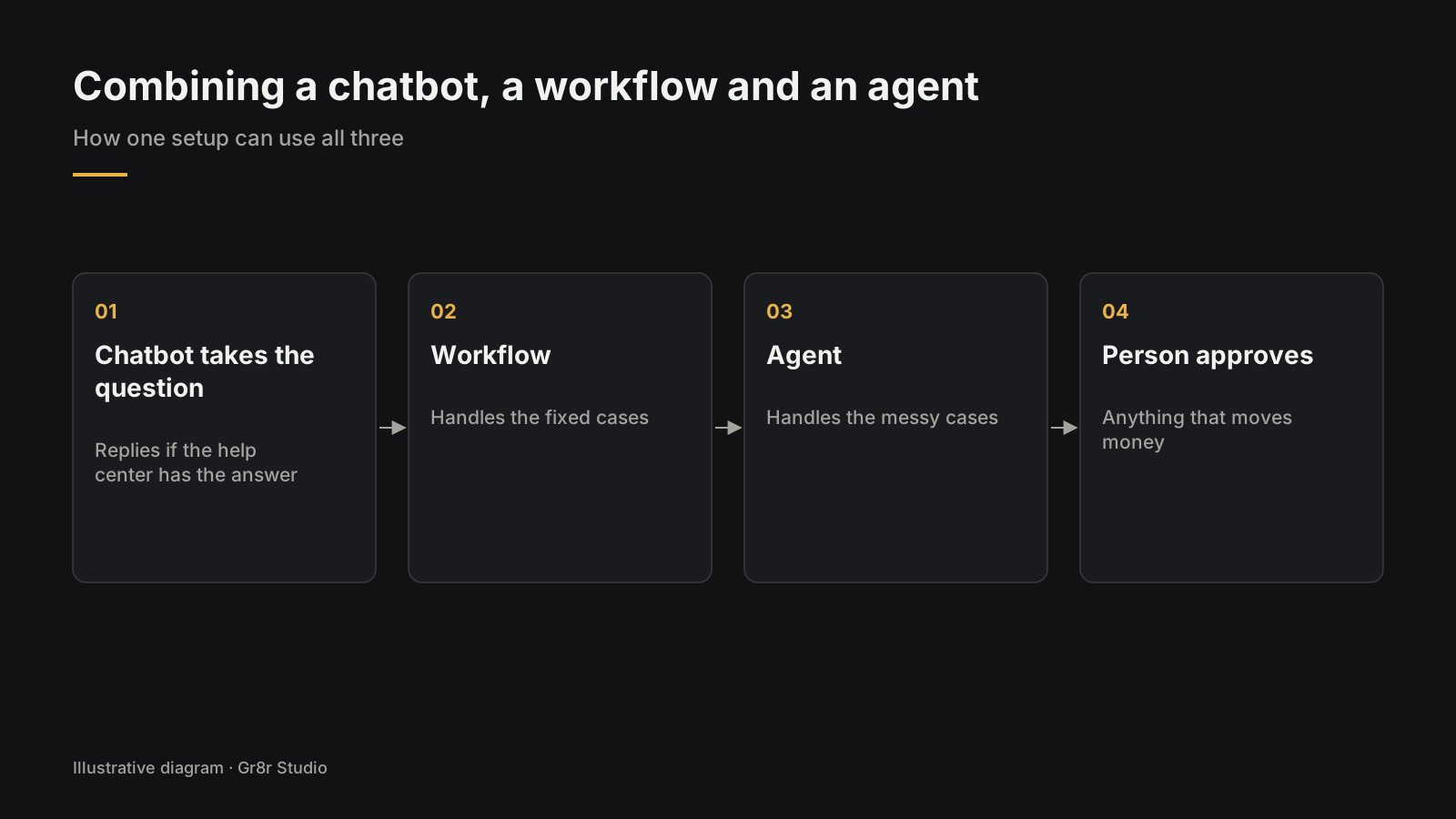
Build them in that order, too. Chatbot or workflow first, because they are cheaper to test. Add the agent for the cases left over.
What should you check before you choose?
Write the job in one sentence, then settle who starts it, who decides the next step, what a wrong step costs, which tools and approvals an agent needs, and where your team sees what ran.
- The job written in one sentence.
- Who starts it: a person, or an event?
- Who decides the next step: your written steps, or the model?
- What a wrong step costs, in money or in trust.
- For any agent: the list of tools, read or write, and which actions need approval.
- A screen where your team can see what ran.
If the answer is an agent and you want help building it, see our AI agent development page. For the basics of automation itself, read what AI automation is.
Frequently asked questions
What is the difference between an AI agent and a chatbot?
A chatbot answers when a person asks, usually from content you already have. An AI agent decides its own next steps, uses tools to act in your systems, and checks the results until the job is done.
Is an AI agent overkill for my business?
Often, yes. If you can write the steps on one page and they rarely change, a workflow is simpler, cheaper and easier to check. Agents fit jobs where the next step depends on what the last step found.
Can a chatbot become an agent?
Yes. When a chatbot is given tools to look up records and take actions, and decides which to use case by case, it becomes a chat agent. It then needs tight permissions and approval for big actions.
Can you use an AI agent, a chatbot and a workflow together?
Yes. A common setup has a chatbot take the question, a workflow handle the fixed cases, an agent handle the messy ones, and a person approve anything that moves money.
Is a workflow with an AI model inside it an agent?
No. If your team wrote the steps in advance and the model only reads or labels along the way, it is a workflow. It becomes an agent when the model decides which step comes next.
About the author
Tanjim Islam is the founder and CEO of Gr8r Studio. He founded the studio in 2023. Here he writes about how Gr8r approaches hiring, product design and AI engineering. More on the About page.
In Relay, a workflow app Gr8r built, the difference shows on the first screen: agents draft actions such as an outreach email or a refund, and those wait for a person to review instead of going out as a chat reply. Built by Gr8r for its own portfolio. Not client work. It runs on demo data, so it shows the screens, not results.
If you want help with this, book a 30 minute call.