Leaving Framer or Webflow: Export and Migration

Tanjim Islam
Founder & CEO · · 7 min read


This post is for teams who have decided to move, or want to know what a move would take. Every fact about the platforms comes from Framer's and Webflow's own help centers, fetched on 25 Oct 2026. We do not tell you where to go next. Platform comparisons live on our compare pages. If you are still deciding whether to move, read signs your startup has outgrown its no code site first.
Can you leave Framer or Webflow?
Yes. Your content comes with you. Your pages, in most cases, get rebuilt.
That is the plain answer from both help centers. Your blog posts, case studies and job listings can leave as files. The designed pages are a different story on each platform, and so are forms, translations and images.
What can you export from Framer?
Content, yes. The built site, no.
Framer's help center is not consistent here. Its article on HTML export says "Framer does not offer HTML export for self-hosting", because published sites rely on Framer's own hosting services (Framer Help, Can I export my website to HTML and self-host it?, updated 15 Sep 2026, fetched 25 Oct 2026). Its data portability page, updated the same day, says published HTML, CSS, JavaScript and assets can be downloaded (Framer Help, Porting your data from Framer, updated 15 Sep 2026, fetched 25 Oct 2026). Neither describes exporting an editable project, so plan to rebuild the pages.
For content, Framer says CMS content "can be exported using plugins into structured formats such as CSV or JSON" (Framer Help, Porting your data from Framer, updated 15 Sep 2026, fetched 25 Oct 2026).
What this means in practice:
- Export each CMS collection with a plugin and open the file. Check that every field is there.
- Download your images and files yourself, and keep them in a folder you control.
- Rebuild the pages on your new platform. Use your live site as the reference.
- Keep the Framer site live until the new one is tested.
What can you export from Webflow?
More code than Framer, but not everything.
On paid Workspace plans, Webflow lets you export "your site's HTML, CSS, JavaScript, and assets" as a ZIP. Site plans alone do not include code export. To do it, open your site, go to Main menu, then Code export, or press Shift + E, then Prepare ZIP (Webflow Help, How do I export my Webflow site code?, updated 31 Oct 2025, fetched 25 Oct 2026).
The same article lists what stays behind. CMS, user accounts, ecommerce content and localized pages "aren't included in exported code". Collection lists show their empty state. Password protection stops working. Site search and native forms do not work on exported sites.
So a Webflow export gives you your static pages and styles. Your CMS content has to come out separately.
How do you get your Webflow CMS content out?
One Collection at a time, as a CSV file.
Webflow's steps: go to the CMS panel, click the Collection, click Export. The export includes archived items (Webflow Help, How do I import content into the Webflow CMS?, updated 18 Aug 2026, fetched 25 Oct 2026).
Three details from that article catch teams out:
- One locale at a time. The CSV only includes items from the locale you are viewing. If your site is in three languages, export three times.
- Rich text comes out as HTML. Your new platform needs to accept it, or someone cleans it up.
- Images come out as links, not files. They are Webflow hosted URLs that point back to the old site, and Webflow warns they break if that site is deleted. Download every image before you cancel anything.
Webflow's guide to moving Collections also notes that reference and multi reference fields need to be rebuilt by hand after import (Webflow Help, Migrate CMS Collection content to another project, updated 5 Jan 2026, fetched 25 Oct 2026). Plan time for that if your posts link to authors or categories.
What should you save before you cancel anything?
Picture the day after you cancel. The old site is gone. What do you wish you had kept?
Save this list first:
- Every live URL, from your sitemap and your analytics. This becomes your redirect map.
- Every CMS export, one file per collection and per language.
- Every image and file, downloaded, not linked.
- Your redirect list. Webflow can export 301 redirects to a CSV (Webflow Help, Import/export 301 redirects, updated 1 Oct 2024, fetched 25 Oct 2026). In Framer, the Redirect Sync plugin exports your redirects as a CSV (Framer Help, Bulk importing and exporting redirects, updated 15 Sep 2026, fetched 25 Oct 2026).
- Page titles and meta descriptions for your top pages.
- Form setups: where each form sends its data, and who gets notified.
- Custom code pasted into the site head or page settings, such as analytics and chat widgets.
- Screenshots of every key page, on desktop and phone, so the rebuild has a reference.
How do you keep your search traffic when you move?
Point every old URL at its closest new page with a permanent redirect.
Webflow's help center says Google will index a new structure in time, "however, 301 redirects are a best practice, especially if you want to maintain ranking power from the old URL" (Webflow Help, How do I set up redirects in Webflow?, updated 19 May 2026, fetched 25 Oct 2026). The same article notes that redirects do not apply to localized slugs, so /old-url and /es/old-url each need their own rule.
Framer's redirect article says its redirects only cover sub-paths on your current domain. To redirect a whole domain, you set that up with the hosting provider for the old domain (Framer Help, How to setup redirects to maintain SEO ranking, updated 15 Sep 2026, fetched 25 Oct 2026).
The simplest rule: keep the same URLs where you can. Then there is less to redirect, and less to break.
What is the step by step migration plan?
Eight steps. The first four happen before you touch anything live.
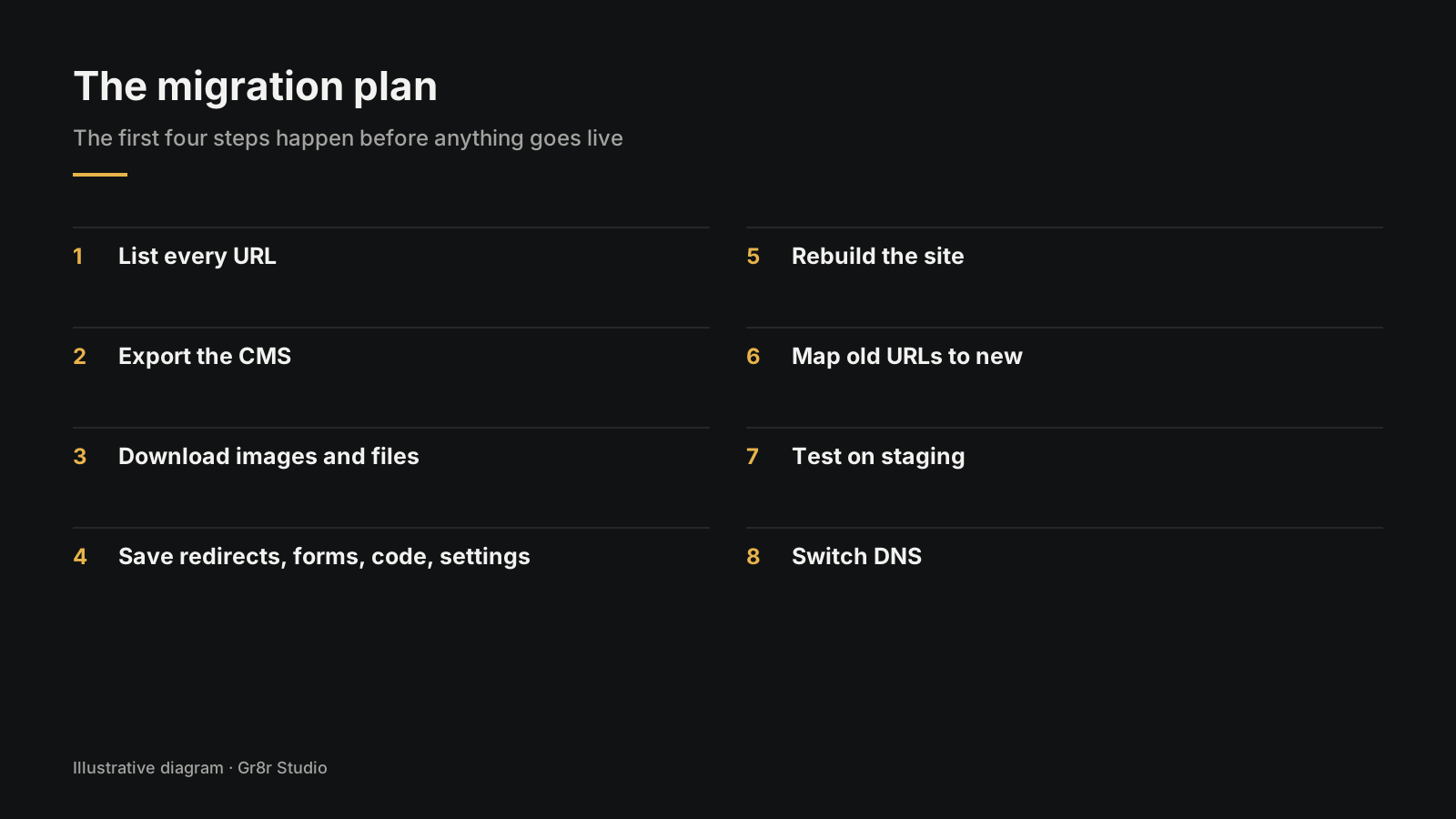
- List every URL on the current site.
- Export the CMS, per collection and per language.
- Download images and files to a folder you own.
- Save redirects, forms, custom code and settings.
- Rebuild the site on its new home, using the screenshots as reference.
- Map old URLs to new ones and load the redirects.
- Test on staging: every form, every redirect, every page on a phone.
- Switch DNS, and keep the old site running until the new one is checked.
After the switch, open Search Console every day for two weeks. For the full launch week list, see our The Startup Website Launch Checklist, Page by Page.
What breaks most often in a move?
From the platform docs, four things:
- Forms. Webflow says forms, including file upload and reCAPTCHA, do not work on exported sites. Rewire every form and send a test.
- Translations. Webflow exports skip localized content, and CMS exports cover one locale at a time.
- Images in rich text. On a Webflow export they still point to the old site. Delete the site and they vanish.
- Linked content. Webflow reference fields come back as plain text and need relinking.
How can Gr8r help with a migration?
We plan the move before we rebuild anything: the URL list, the exports, the redirect map. Clients own everything once it's paid for.
Our founder, Tanjim Islam, is a Framer Pro Expert, and Gr8r Studio also has its own Framer profile. We designed and built the Webflow website for Orthotropic. For HostOp, we designed the product, built its Framer website and built an agentic design system for it. See our Framer agency page, or website design and development for builds on other stacks.
Frequently asked questions
Can I export my Framer site to HTML?
Framer's help center gives mixed answers: one article says it does not offer HTML export for self hosting, another says published site files can be downloaded. Neither gives you an editable project. CMS content exports with plugins into CSV or JSON. Plan to rebuild the pages.
Can I export my Webflow site's code?
Yes, on paid Workspace plans. Open the site, go to Main menu, then Code export, or press Shift + E, and download the ZIP. Site plans alone do not include code export.
Does Webflow code export include the CMS?
No. Webflow says CMS content, user accounts, ecommerce and localized content are not in exported code, and forms and site search stop working. Export each CMS Collection separately as a CSV file.
How do I keep SEO when I leave Framer or Webflow?
List every live URL, keep URLs the same where you can, and set a 301 redirect from each old page to its closest new page. Redirect localized paths separately, then watch Search Console for errors after the switch.
Can Gr8r help us move our website?
Yes. We plan the URL list, exports and redirect map before rebuilding. See the Framer agency page or the website design and development page for how we work.
About the author
Tanjim Islam is the founder and CEO of Gr8r Studio. He founded the studio in 2023. Here he writes about how Gr8r approaches hiring, product design and AI engineering. More on the About page.
If you want help with this, book a 30 minute call.